
Every Location Verified : Introducing Review and Approve in Event Summary


Open any event in Event Summary and you'll see exactly where every location stands and not just that the data came in, but who's checked it, what still needs a look, and what's locked in as final. That's Review & Approve: a live status on every location, plus the tools to review, edit, and approve on the data without leaving it.
A status for every location
Every location now carries a real status i.e. in progress, completed, reviewed, approved, right inside the record itself. Whether it's a daily field log, a groundwater monitoring round, or an EHS audit, field crews and reviewers see the same picture, so there's never a question of what stage something is at.
How Complete, Review, and Approve work together
1. Complete
Field teams work exactly as they do today from the mobile app, but they now can mark locations with their current status. Recording data automatically sets a location to "in progress.” Once it’s marked as complete, it’s ready to be reviewed online.

2. Review
On the web, a reviewer can see the list of locations and their status. Click on a location to start the review. Reviewers can edit the data itself, fix what needs fixing, and add comments or questions, all in one pass.
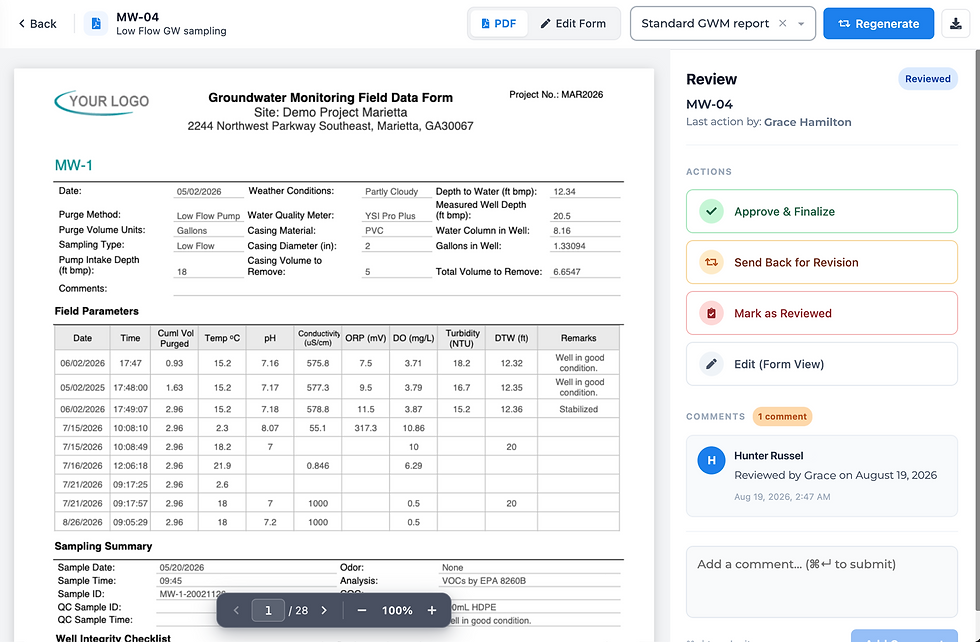
3. Approve
Approving locks the data from being edited. It can be reopened, but it’s a deliberate step and all tracked with QNOPY’s audit trail.

Why this changes how you report
Reporting gets sharper. "Has data" and "reviewed and approved" are now two different, visible states, so status reporting reflects the real picture, not a guess.
The audit trail builds itself. Every edit, comment, and approval sits with the location it belongs to, tied to who did it and when the same kind of office oversight real-time sync already gives you on the collection side.
Locking on approval means approved data stays approved, and reopening it takes a real decision, not an accident.
Where to find it
Live now, on the web, inside every event. Click on any event on the web portal and choose ”Review.” Each location's status, comments, edits, and approval controls are right there, no separate tool, no digging.
Want to see how this fits your team's workflow? Reach out to your QNOPY contact and we are happy to walk through it.


Comments